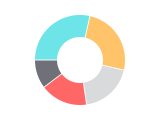
Pie chart and donut chart - definition, examples, and best practices.
To create a pie or doughnut chart in Google Slides, install Chartbuddy from the Chrome Web Store, open your presentation, select your data, and choose the pie or doughnut chart type. Chartbuddy renders clean segments with custom colors, labels, and formatting, built natively inside your slide with live Google Sheets sync.
What is a pie chart?
A pie chart divides a circle into slices, where each slice represents a proportion of the whole. The size of each slice corresponds to its percentage of the total, making it easy to see how parts contribute to 100%. Pie charts are among the most recognized chart types - almost everyone can read one without explanation.
What is a donut chart?
A donut chart is a variation of the pie chart with a hollow center. It shows the same proportional information but leaves space in the middle - often used to display a key metric, total value, or label. The donut chart offers a cleaner, more modern look while retaining the part-to-whole message.
When to use pie and donut charts
Pie and donut charts work best when you're showing simple composition with a small number of categories. Typical use cases:
- Budget allocation - showing how total budget is split across four or five departments in an executive summary
- Revenue mix - displaying the proportion of revenue from each product line or customer segment
- Survey results - showing response distribution for a single question (e.g., 45% agree, 30% neutral, 25% disagree)
- Market share - visualizing your share relative to competitors when there are only a handful of players
The key constraint: pie charts become difficult to read with more than 5-6 slices. If you have many categories, a bar graph almost always communicates the data more clearly.
Pie chart vs donut chart
Functionally, they show the same data. The choice is mostly aesthetic. Donut charts work well when you want to feature a key number in the center (e.g., total revenue, overall score). Pie charts can be slightly easier to read when comparing slice sizes because the slices share a common center point.
Best practices
- Limit to 5-6 slices maximum. More than that and the chart becomes cluttered - group small categories into "Other"
- Order slices from largest to smallest, starting at 12 o'clock and going clockwise. This makes comparisons easier
- Avoid 3D pie charts. They distort proportions and make slices closer to the "front" appear larger than they are. Always use flat, 2D pie charts
- Label slices directly with both the category name and percentage. Don't rely on a separate legend - it forces the reader to look back and forth
- Don't use pie charts to show change over time. Two pie charts side by side (this year vs last year) are very hard to compare. Use a bar graph or line graph instead
Create pie and donut charts in Google Slides with Chartbuddy
Build professional pie charts and donut charts directly in your presentation. Customize colors, labels, and formatting - and keep your charts consistent across every deck your team creates.
No credit card required · Chrome & Edge