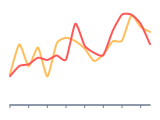
Time series graph - definition, examples, and best practices.
To create a time series chart in Google Slides, install Chartbuddy from the Chrome Web Store, open your presentation, select your date-based data, and choose the time series chart type. Chartbuddy formats date axes automatically and renders trend lines natively inside your slide with live Google Sheets sync.
What is a time series graph?
A time series graph plots data points at successive, equally spaced time intervals. The x-axis always represents time - hours, days, weeks, months, quarters, or years. The y-axis shows the measured variable. While a standard line graph can plot any two variables against each other, a time series graph is specifically designed for temporal data, making it the default choice for tracking anything that changes over time.
Time series graphs are optimized for revealing three patterns: trends (long-term direction), seasonality (repeating cycles), and anomalies (unexpected spikes or drops).
When to use a time series graph
Any time your data has a timestamp and you want to understand how a metric evolves. Typical use cases:
- Financial reporting - tracking revenue, costs, or margin over months or quarters. The backbone of most FP&A dashboards
- Operational monitoring - visualizing daily order volume, response times, or system uptime to catch anomalies early
- Marketing performance - plotting website traffic, conversion rates, or ad spend over time to evaluate campaign effectiveness
- Forecasting - overlaying historical actuals with projected values to show whether current trajectory aligns with targets
- Seasonal analysis - identifying recurring patterns (holiday sales peaks, end-of-quarter spikes) that inform planning
Time series graph vs line graph
Every time series graph is a line graph, but not every line graph is a time series graph. The distinction matters because time series data comes with specific considerations - consistent intervals, seasonality, and trend decomposition - that don't apply to a generic line graph plotting two unrelated variables.
Best practices
- Keep time intervals consistent. If you're plotting monthly data, every month should be equally spaced on the x-axis. Mixing intervals (monthly for some periods, quarterly for others) distorts the visual trend
- Mark important events directly on the chart. If revenue dipped in March because of a pricing change, annotate it. Context transforms a chart from data display into a narrative
- Use reference lines for targets, budgets, or prior year comparisons. A horizontal target line or a faded "last year" series gives the reader a benchmark
- Be careful with very long time horizons. A chart showing daily data over five years will have too many points to read. Aggregate to weekly or monthly where appropriate
- For multiple series, keep the number manageable (3-4 maximum) and use distinct colors. Highlight the most important series and mute secondary ones
Create time series graphs in Google Slides with Chartbuddy
Build professional time series graphs directly in your presentation. Connect to Google Sheets for automated data updates - ideal for recurring board decks and monthly reporting cycles.
No credit card required · Chrome & Edge