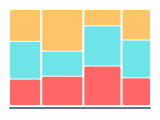
Mekko chart - definition, examples, and best practices.
To create a mekko chart in Google Slides, install Chartbuddy from the Chrome Web Store, open your presentation, select your data, and choose the mekko chart type. Chartbuddy builds variable-width columns natively inside your slide, encoding two dimensions of data at once, with full customization and live Google Sheets sync.
What is a mekko chart?
A mekko chart (also called a marimekko chart) uses variable-width columns to display two dimensions of data simultaneously. Unlike a standard bar graph where all bars have the same width, a mekko chart encodes a second variable in the column width. The height of each segment within a column represents one measure (e.g., market share), while the width of the column represents another (e.g., market size).
This dual encoding makes the mekko chart uniquely powerful for strategic analysis - it shows both the size of a market and the competitive dynamics within it in a single view. It's a chart type you'll find in virtually every strategy consulting deck.
When to use a mekko chart
Mekko charts are best suited for situations where two related dimensions need to be compared at once. Typical use cases:
- Market landscape analysis - mapping market size by segment (width) against each competitor's share within that segment (height). This is the classic consulting use case
- Portfolio analysis - showing revenue by business unit (width) against margin or growth rate composition (height) to visualize where value is created
- Geographic comparison - comparing region size (width) against product mix or channel mix within each region (height)
- Competitive positioning - showing how industry revenue is distributed across segments and which players dominate which segments
Mekko charts work best when you have 3-7 columns and 2-5 segments per column. More than that and the chart becomes difficult to read.
How to read a mekko chart
Read the width of each column first - wider columns represent larger categories (bigger markets, bigger business units). Then read the segments within each column from bottom to top - they show the composition within that category. The total area of each colored rectangle represents its absolute value across both dimensions.
Best practices
- Label both dimensions clearly. Width and height represent different variables - if the reader doesn't understand what each encodes, the chart fails
- Order columns by width (largest to smallest) unless there's a logical grouping that takes priority (e.g., geographic regions from West to East)
- Use a consistent color scheme for the segments across all columns so the reader can track a category (e.g., a specific competitor) across the chart
- Add percentage labels within segments. Since column widths vary, the visual size of segments can be misleading - numbers add precision
- Consider whether a simpler chart would work. Mekko charts are information-dense. If your audience isn't comfortable with them, a stacked bar chart or two separate charts may communicate more effectively
Create mekko charts in Google Slides with Chartbuddy
Build professional mekko charts directly in Google Slides - the chart type that's been a consulting staple, now available natively in your presentations. Customize segment colors, add labels, and adjust column widths to tell a clear strategic story.
No credit card required · Chrome & Edge